Open a sports blog and look at six article cards without reading their headlines. If each shows equipment against the same dramatic stadium, the site may look consistent at first. Look longer and the stories begin to blur together. A guide to storing a tennis racket and an essay about pre-match nerves have been given the same visual treatment, although they ask readers to think about very different things.
The editorial challenge is deciding which similarities help readers recognize a series and which differences help them choose a story. An AI Photo Editor can support background changes, but it cannot make that editorial decision for you. PicEditor AI is a candidate for developing variations from equipment photographs once you have decided what the pictures should share and where they should diverge.
Find the Repeated Choice Behind the Repeated Picture
Start with the pictures already planned for the page. Lay small copies next to their article titles in a document or on a working board. This contact sheet can be assembled in whichever layout tool you already use. Give the copies equal space so one oversized picture does not dominate the comparison before you have looked at its content.
Suppose three forthcoming pieces concern racket storage, football training equipment, and caring for a boxing glove. All three images currently use a dark arena background. Ask why. If the answer is simply that dramatic light made each isolated photograph look impressive, the repeated choice has no connection to the articles. It has become a habit inherited from the first successful image.
Similarity itself is not the defect. A recognizable series might use close views of objects, soft side lighting, and restrained colors. Those decisions can continue across several images without requiring every object to occupy the same imaginary stadium. Keep the choices that support the publication’s tone; reconsider the ones that make unrelated subjects appear interchangeable.
It helps to compare the thumbnails with the headlines temporarily covered. Can you distinguish a practical care guide from a motivational essay? You do not need to infer the exact title from an object photograph. You should, however, see a reason for the selected setting beyond its ability to make equipment look expensive.
Share the Lighting While Changing the Article Cue
Separate the visual brief into common choices and a cue specific to each article. Common choices might be a quiet palette and a modest amount of empty space around the equipment. The article cue is the part that makes this particular image belong beside this particular headline. An AI Photo Editor is easier to evaluate when those two jobs are written separately.
For a proposed series built from your own equipment photographs, the brief could look like this. These are creative directions, not claims that the depicted objects belong to a professional team or that a tool will reproduce the requests exactly.
| Article | Distinctive setting cue |
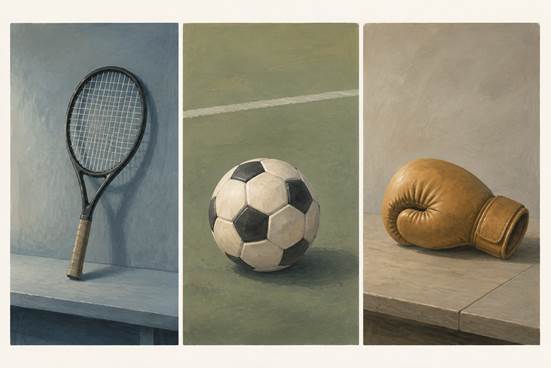
| Storing a racket at home | A plain indoor shelf surface |
| Organizing football training equipment | A simple ground-level training surface |
| Caring for a boxing glove | A quiet tabletop with visible glove texture |
The table makes one difference deliberate: the setting follows the subject. It does not prescribe matching shadows down to the pixel or an identical object position. A racket’s long shape may need a different amount of surrounding space from a glove. Give both room to read instead of forcing them into one rigid arrangement.
For this assignment, the photo editing tool should help explore those settings while leaving the equipment recognizable. PicEditor AI supports written requests for background changes. Describe the proposed surface and the visual qualities it should share with the series. Treat any request to preserve stitching or string geometry as an instruction you must inspect, rather than a lock the system promises to enforce.
Develop Each Variation From Its Own Photograph
Use a photograph that already shows the object clearly. A racket partly hidden behind a bag leaves less visible material to judge than a straightforward view of the frame and strings. For a care article, details such as the glove’s seams may be the reason the picture is useful. Choose the starting image for that editorial job before worrying about its background.
A proposed request for the racket image might ask for a plain indoor shelf setting, soft light from the left, and muted colors, with the racket itself unchanged. Review the generated candidate against that brief. If the background competes with the strings, make the setting quieter. If the frame has changed shape, return to the original photograph rather than treating the alteration as a new design direction.
The next object needs its own request. Copying the full racket prompt onto a boxing glove can carry over details that do not belong there. Retain the shared light and palette, then describe a surface appropriate to the care article. The photo editing tool is helping you develop a family of images; the written brief still needs to distinguish one family member from another.
Keep the physical object prominent enough to remain recognizable when the image is small. On the working contact sheet, a pale racket on a pale shelf may disappear even if its full-size version looks elegant. A darker surface could resolve that problem without introducing the dramatic arena lighting you were trying to leave behind.
Place the racket, football, and glove images in a row. They can share soft light while retaining the shelf, training surface, and tabletop that distinguish their subjects. If the football fills nearly its whole frame while the racket looks distant, adjust their apparent scale before adding decorative details. The group may need a change in framing more than another background.
Judge the Images Beside Their Actual Neighbors
Return the candidates to the page where readers will encounter them. A large standalone image encourages scrutiny of texture and atmosphere; a small article card asks for quick recognition. Look at both. A change that improves one view can weaken the other, particularly when a delicate object loses its outline against a similarly colored surface.
Check the order as well as the individual pictures. Two pale tabletop images placed together may feel repetitive even if each suits its article. Moving one beside a darker training image might give the page enough variation without another edit. Exhaust that simple layout option before generating a replacement that changes the agreed visual direction.
One outlier can be worth keeping. An article about repairing heavily worn equipment may need a close, rough-looking photograph that interrupts the otherwise quiet series. If the surface damage is relevant to the article, smoothing it away would remove useful information. The image has earned its difference through the story it accompanies.
A Recognizable Series Leaves Room for Different Stories
Evergreen equipment guides leave room to construct a setting around a photograph you can use. PicEditor AI can help explore that setting once you have a reason for changing it. Match reporting calls for a different choice: use an appropriate documented photograph rather than presenting a constructed equipment scene as a record of the event.
Keep the series consistent enough to feel considered, then let each story change the picture where it needs to. The useful final check is the page itself: can a reader recognize a coherent publication and still see several distinct articles worth opening?