Amazon Prime Video is one of the most popular streaming platforms, offering thousands of movies, shows, and original content. But did you know you don’t have to keep all that entertainment to yourself? If you’re wondering how to share Prime Video with family, the good news is that Amazon has a built-in solution: Amazon Household.
In this guide, we’ll show you how to use Amazon Household to share your Prime benefits, including Prime Video, with your loved ones, without sharing your login credentials. Whether you live with a partner, roommate, or family members, this method is safe, official, and easy to manage.
What Is an Amazon Household? & How Does It Work?
Amazon Household is a feature that allows Amazon Prime members to share Prime Video with family and other benefits with a small group. Instead of giving out your password, you invite other Amazon users into your digital household.
1.1 Who Can Be Added to an Amazon Household?
Amazon Household supports:
- 2 Adults: Each with their own Amazon account and login.
- Up to 4 Teens (ages 13–17): Teens get their own login and can shop or stream with parental oversight.
- Up to 4 Children (under 13): Children can only use certain features, like Kindle content or Prime Video Kids profiles.
Each member has their own Amazon login and viewing preferences, but the benefits of the Prime subscription are shared.
1.2 Key Benefits of Amazon Household
If you’re still wondering what Amazon Household is and whether it’s worth using, here are its main advantages:
- Shared Prime Benefits: Free shipping, Prime Video access, Prime Reading, and more.
- Separate Accounts: Each member keeps their individual settings and history.
- Parental Controls: For teens and children, parents can approve purchases and set content restrictions.
So, how does Amazon Household work? In short, it enables safe, manageable sharing of Prime services across multiple people, perfect for modern families and shared households.
What Prime Video Features Can Be Shared?
Once a Household is set up, how to share Prime Video with family becomes incredibly simple—no separate logins or app downloads are needed.
Here’s what you can expect:
1 Streaming Prime Video Content
Every adult, teen, or child added to the Household will be able to stream Prime Video from their own Amazon account, using their own devices.
2 Personalized Watchlists & Profiles
Each user gets their own watch history, recommendations, and watchlists. This ensures your horror favorites won’t interfere with your kid’s animated lineup.
3 Simultaneous Streams
Amazon allows three simultaneous streams on different devices and up to two streams of the same title at once. This means multiple people can watch different content at the same time.
4 Download Privileges for Offline Viewing
Yes, Household members can also download Prime Video titles to their devices, provided they’re using compatible apps like Prime Video on iOS, Android, or Fire tablets.
However, it’s important to obey Prime Video download rules to avoid hitting device or download limits. For instance, you can only download content on two compatible devices per account, and some titles may be unavailable for offline access after a certain period.
How to Set Up an Amazon Household
Setting up a Household is easy and takes just a few minutes:
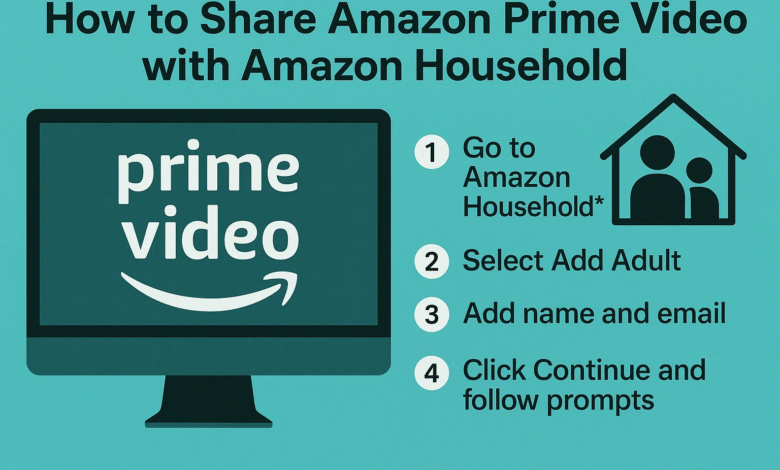
- Go to Amazon Household settings.
- Click “Add an Adult”, “Add a Teen,” or “Add a Child.”
- If adding an adult, they must accept your invitation via email or in person.
- Both adults will be asked to agree to share payment methods and Prime benefits.
Once connected, all added members will have access to shared content through their own Amazon logins.
How to Share Prime Video Once Household Is Set Up
After you’ve configured your Household:
- Each member logs into their own Amazon account on the Prime Video app or website.
- They automatically get access to the Prime Video library.
- For mobile users, make sure to log in to the Prime Video app using the account linked to the Household.
- They can create their own viewing profiles and start streaming instantly.
You no longer have to share your password or worry about others accidentally buying movies or shows.
Limitations & Things to Know
While Amazon Household is a great way to share Prime Video with family, there are a few important restrictions to consider:
1. Shared Payment Method Required
To form a Household with another adult, you must agree to share your payment methods. This allows purchases across both accounts, so only do this with someone you trust.
2. Only Two Adults Allowed
You can only have two adult members in a Household. If you’re in a larger household (e.g., multiple roommates), only two of you will get full Prime benefits.
3. Switching Households Has Limits
You can only leave or join a new Household once every 180 days. So if you’ve linked accounts with someone, you’ll have to wait 6 months to change it.
4. Purchases May Still Be Account-Tied
While streaming content is shared, certain purchases (like rented or bought movies) may remain tied to the account that paid for them. Be mindful when buying content if you want others to access it.
Final Thoughts
If you’re looking for an easy, secure, and official way to share Prime Video with family, Amazon Household is the solution. It lets you distribute streaming access, downloads, and other Prime perks without giving out your login details.
Now that you understand how to share Prime Video with family, you can maximize your Prime membership by including the people you live with or spend time with. From customized profiles to simultaneous streaming, Amazon Household ensures everyone gets a personalized yet connected experience.
So don’t keep Prime Video to yourself—set up Amazon Household today and start enjoying all the benefits together.